Autoclicker 95
A tiny Windows autoclicker with a Windows 95 look. Script clicks and key presses, record macros, repeat them as long as you need.
One native exe, about 150 KB. No installer, no dependencies, about 2 MB of RAM.
30 days free, then a one-time purchase. No subscription.
Microsoft Store: coming soon
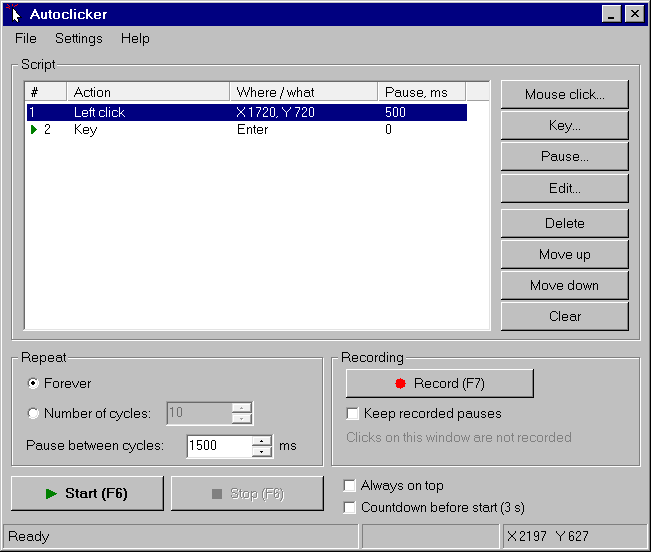
Step scripts
Build a script from steps: mouse click, double click, hold and release with the left, right or middle button, at a chosen point or at the cursor.
Keys and combinations
Press, hold and release a key or a key combination as a step.
Pauses
Add a pause step, and set a pause after every step.
Repeat
Repeat the script forever or N times, with a pause between cycles.
Macro recording
Record mouse and keyboard actions and play them back.
Global hotkeys
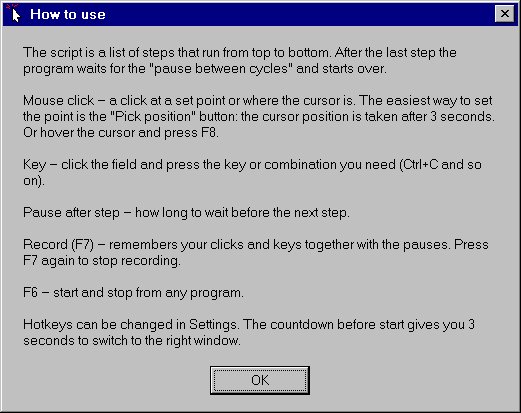
Customizable hotkeys that work from any window. Defaults: F6 start/stop, F7 record, F8 pick position.
Countdown and always on top
Optional 3 second countdown before start. Keep the window always on top.
Saved scripts
Scripts are saved as .acs files that you can keep and reuse.
11 languages
English, Russian, Ukrainian, German, French, Italian, Spanish, Portuguese, Japanese, Korean, Chinese.
Tiny and portable
A single native exe of about 150 KB. No installer, no dependencies, about 2 MB of its own RAM.
Wait for color
A step that waits until a point on the screen turns the color you chose, then lets the script continue. Pick the point with the eyedropper and the color with the color dialog.
Included in the full version.
Build a script
Add steps: clicks, key presses, pauses. Or press F7 and record a macro.
Set the repeat
Choose forever or N times, and the pause between cycles.
Press F6
Start and stop from any window with the global hotkey.
Free trial
30 days, everything except the bonus step.
Full version
One-time purchase, price to be announced. Unlocks the “Wait for color” step. Payments are handled by Lemon Squeezy (cards, PayPal, VAT included in the checkout).
The full version will be available soon. Contact us by e-mail
How does the trial work?
You can use the program for 30 days from the first launch. After that you need a license key to keep using it. The full version is a one-time purchase, not a subscription.
On how many computers can I use one license?
To be announced.
What Windows versions are supported?
Windows 10 and Windows 11.
Does it need administrator rights?
Not for normal use. Windows may ignore simulated clicks and keys sent to windows that run as administrator. To control such a program, run Autoclicker 95 as administrator too.
My antivirus flags the file. Is it a virus?
Autoclicker 95 simulates mouse and keyboard input and registers global hotkeys, which some antivirus programs treat as suspicious behavior, especially for small unsigned programs. If you see a warning, you can check the file on your own, or write to us through the contact link below.
Does it collect data?
No telemetry and no ads. The program connects to the internet only to activate and check a license key. See the privacy page for details.
Can I use it in games?
Many games and online services forbid automation. You are responsible for how you use the program. See the license agreement.
Where are my settings stored?
Locally on your computer. See the privacy page.
 Start